
Google Labs AI is Google’s platform for experimenting with new artificial intelligence tools before some of those technologies become mainstream products. Google Labs currently features AI experiments for video creation, music, design, coding, marketing, research, learning and AI application development.
If you want to try Google AI tools for free, Google Labs is one of the best places to discover Google’s latest experimental AI products and see which ones are available to you. However, Google Labs is not one single AI application, and individual experiments can have different access requirements, features and usage limits.
Google describes Labs as a place where users can get early access to experiments, provide feedback and help shape technologies that may eventually become everyday products.
This makes Google Labs different from a normal AI chatbot.
Instead of opening one tool and asking it questions, you can visit Google Labs and choose a specialized AI experiment based on what you actually want to accomplish.
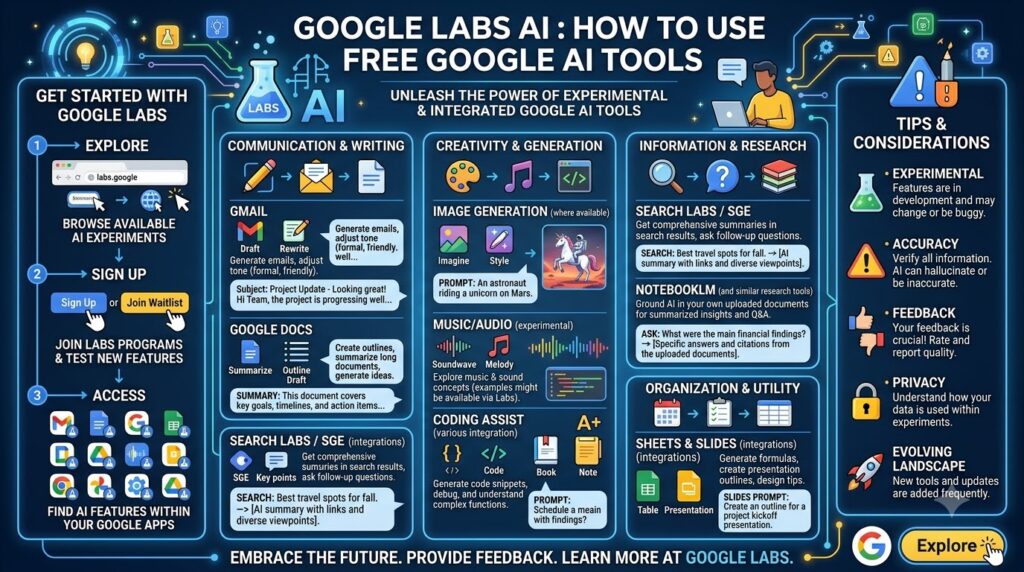
For example, you can explore:
- Google Flow for AI-powered creative and video work
- Google Flow Music for creating music
- Stitch for AI-powered UI design
- Jules for coding tasks
- Opal for building AI mini-apps
- Pomelli for marketing content
- Mixboard for visual idea development
- Learn Your Way for AI-assisted learning
- Literature Insights for research
- Computational Discovery for agentic research workflows
Google’s current Labs homepage lists these and other experiments across categories including Create, Develop, Explore and Learn.


What Is Google Labs AI?
Google Labs AI is Google’s experimental AI platform where users can discover and test emerging artificial intelligence products and research projects.
The word “Labs” is important because these are not necessarily finished products.
Google explains that some Labs experiments eventually grow into products that become part of Google’s everyday ecosystem. The current Labs page gives examples including Gemini, Google Flow, Gemini Notebook and Google Flow Music, which originated from earlier experimental projects.
This means Google Labs can be viewed as a testing ground for new AI technology.
The platform is especially useful for people who want to explore:
- Generative AI
- AI video generation
- AI image creation
- AI music generation
- AI coding
- AI agents
- AI design
- AI marketing
- AI research
- AI education
- AI workflow automation
- AI application development
Rather than waiting for every experiment to become a polished commercial product, users can sometimes try the technology earlier through Labs.
How to Use Google Labs AI
Using Google Labs is straightforward, although the exact process can differ from one experiment to another.
Step 1: Open Google Labs
Visit the official Google Labs website:
The homepage shows Google’s current experiments.
Google organizes Labs experiments into different areas so users can find tools based on their interests and goals.
Step 2: Choose an AI Experiment
Select the tool that matches your task.
For example:
Video creation: Google Flow
Music creation: Google Flow Music
UI design: Stitch
Coding: Jules
AI mini-apps: Opal
Marketing: Pomelli
Research: Literature Insights
Learning: Learn Your Way
The current Google Labs homepage confirms these experiment categories and descriptions.
Step 3: Open the Experiment
Click the relevant Try It Now, Learn More or equivalent button.
Some experiments open directly in Google’s application environment, while others may require a separate Google Labs or Google service page.
Step 4: Sign In
Some Google AI experiments require a Google Account.
The exact eligibility requirements can depend on the individual experiment.
Do not assume that because one Labs experiment is available to you, every experiment will automatically be available.
Step 5: Read the Tool Instructions
Before entering your first prompt, look at the experiment’s interface.
Every tool has a different purpose.
A video-generation application will require different inputs from an AI coding agent.
Step 6: Enter Your Prompt
Use natural language to describe the result you want.
For example:
Create a cinematic video showing a futuristic city at sunset, with realistic lighting, slow camera movement and a premium science-fiction atmosphere.
For UI design:
Create a responsive dashboard for a project management application with a sidebar, analytics cards, task management and a modern professional interface.
For coding:
Analyze this project, identify the cause of the login error, fix the issue and add a regression test.
Step 7: Review the AI Output
Do not immediately publish or deploy the result.
Check whether the AI followed your instructions.
Look for:
- Incorrect information
- Design problems
- Coding errors
- Missing requirements
- Unexpected changes
- Quality issues
- Copyright or licensing concerns
Step 8: Refine the Result
AI tools work particularly well when you treat the first generation as a draft.
You can provide another instruction such as:
Make the lighting more realistic and reduce the amount of background detail.
or:
Keep the existing layout but make the typography more readable on mobile screens.
Step 9: Export, Save or Share
Depending on the experiment, you may be able to export, download, save or share the resulting content.
The exact options vary by Google Labs product.
Is Google Labs AI Free?
Google Labs itself is not a single paid or free AI application, so there is no universal “Google Labs free plan” that applies to every experiment.
Individual Labs tools can have different access models.
Some experiments may be available to try without a paid subscription, while others can have:
- Credit limits
- Usage restrictions
- Waitlists
- Country restrictions
- Account requirements
- Subscription-based features
- Experimental access limitations
Therefore, users searching for free Google AI tools should check the individual experiment rather than assuming that every tool provides unlimited free usage.
The availability of Google Flow, for example, should be checked directly on its current product page before publishing pricing information.
What AI Tools Are Available on Google Labs?
Google Labs changes over time, so the list of experiments should be treated as dynamic.
The current Google Labs homepage includes several notable AI projects.
Google Flow
Google Flow is an AI creative studio designed to help users bring stories to life through AI-powered visual creation. Google currently presents Flow as one of the primary creative experiments on Labs.
Flow is especially relevant to:
- Video creators
- Filmmakers
- YouTubers
- Social media creators
- Designers
- Storytellers
- Creative professionals
You can use a tool such as Flow when your goal is visual storytelling rather than ordinary text generation.
Google Flow Music
Google Flow Music is an AI music studio designed to help users create songs and music through an AI creative workflow. Google describes it as an agentic creative partner that can help with lyrics, melodies and new musical genres.
It can be interesting for:
- Musicians
- Songwriters
- Content creators
- Music experimenters
- Video creators
Stitch
Stitch is an AI design canvas that transforms natural-language descriptions into high-fidelity user-interface designs that users can iterate and collaborate on.
This makes Stitch useful for:
- UI designers
- UX designers
- Web developers
- App developers
- Startup founders
- Product teams
Instead of manually drawing every interface element from scratch, you can describe the interface you want and use AI to explore the design direction.
Pomelli
Pomelli is an AI-powered marketing tool designed to create scalable, on-brand content for businesses.
Pomelli can be relevant to:
- Small businesses
- Marketing teams
- Social media managers
- Freelancers
- Entrepreneurs
- Content marketers
The “on-brand” aspect is particularly useful because businesses often need marketing material that follows a consistent visual and communication style.
Jules
Jules is an asynchronous coding agent that automates software-development tasks such as bug fixes, writing tests and adding features.
This makes Jules different from a simple AI code generator.
An AI coding agent can be given a larger development objective rather than just being asked for one isolated function.
For example:
Find the cause of this bug, fix it, add a test and explain the changes.
Developers should still review AI-generated code before merging changes into production projects.
Opal
Opal is a Google Labs tool for building, editing and sharing AI mini-apps through natural-language instructions.
This is especially interesting for people who want to experiment with:
- No-code AI
- Low-code development
- AI workflows
- Productivity applications
- AI prototypes
- Mini-apps
For example, you could describe an application that takes a blog topic, generates content ideas and organizes them into categories.
Mixboard
Mixboard is an AI-powered concepting board designed to help users explore, expand and refine ideas.
This type of AI tool can be useful during the early stages of:
- Branding
- Product design
- Creative projects
- Moodboards
- Visual brainstorming
- Campaign planning
Literature Insights
Literature Insights is a research-oriented Google Labs experiment designed to help users find papers, structure information into data tables and create artifacts such as reports and slide decks.
This makes it potentially useful for:
- Researchers
- Students
- Academics
- Writers
- Analysts
- Knowledge workers
However, AI-generated research summaries should always be checked against the original papers.
Hypothesis Generation
Hypothesis Generation is a multi-agent research experiment designed to simulate parts of the scientific method, identify knowledge gaps and generate hypotheses.
This is an example of how Google Labs goes beyond conventional chatbots.
Instead of simply answering questions, an AI research workflow can help users explore potential research directions.
Computational Discovery
Computational Discovery is an agentic research engine that generates and scores code variations to help discover models and accelerate experimentation.
This type of experiment is particularly relevant to researchers and technical users working with computational methods.
Google Labs AI for Content Creators
Google Labs can be useful throughout the content-creation process.
A creator could combine several AI tools rather than relying on one application.
For example:
Step 1: Brainstorm an idea.
Step 2: Create a visual concept.
Step 3: Generate video content.
Step 4: Create supporting music.
Step 5: Develop marketing assets.
Step 6: Publish the finished content.
This represents a broader AI content creation workflow.
For a YouTube creator, for example, Google Flow could be relevant for visual storytelling while Flow Music could be relevant for music experimentation.
Google Labs AI for Bloggers
Bloggers can also use Google Labs as part of an AI-assisted content workflow.
Potential uses include:
- Brainstorming article ideas
- Creating visual concepts
- Designing website interfaces
- Building small AI utilities
- Research exploration
- Marketing content
- Social media concepts
For example, a blogger could use AI to create a small internal tool that converts article titles into content outlines.
Opal’s natural-language mini-app workflow makes this type of experiment particularly interesting.
Internal link: You can naturally link the phrase free AI keyword research tools for bloggers to your relevant Toolsvora article here.
Google Labs AI for Developers
Developers have several reasons to explore Google Labs.
Jules focuses on coding workflows, Stitch focuses on UI generation, Opal focuses on AI mini-apps and Stax is designed as an AI evaluation toolkit for testing models and prompts.
A developer could potentially use different tools at different stages:
Idea → UI prototype → Application → Testing → Refinement
This is an example of how AI development is moving beyond simple code completion.
Jules for Coding
Use Jules when the task involves software-development work such as:
- Bug fixes
- Tests
- Feature implementation
- Code changes
- Development workflows
Stitch for UI
Use Stitch when you want to turn a design concept into an interface.
Opal for Mini-Apps
Use Opal when you want to experiment with an AI-powered application without building every component manually.
Stax for AI Evaluation
Stax is designed to test models and prompts so developers can evaluate AI products more confidently.
Google Labs AI for Students
Google Labs also contains experiments designed around learning and research.
Learn Your Way is an AI learning tool that transforms content into a dynamic learning experience tailored to the learner.
Students can potentially use AI learning tools for:
- Concept explanations
- Study material
- Research exploration
- Learning reinforcement
- Knowledge organization
However, students should use AI as a learning assistant rather than submitting unverified AI-generated material as their own academic work.
How to Write Better Google Labs AI Prompts
A detailed prompt usually gives the AI more useful context.
A simple formula is:
Task + Context + Subject + Style + Constraints + Output
For example:
Weak Prompt
Create a video about a city.
Better Prompt
Create a cinematic 15-second video of Mumbai at night during light rain, showing busy streets, realistic traffic, reflections on wet roads and a slow camera movement. Use a premium documentary-style visual aesthetic.
The second prompt tells the AI:
- Location
- Time
- Weather
- Subject
- Camera movement
- Visual style
- Duration
This reduces ambiguity.
Prompt Formula for AI Images
Create [subject] in [environment], using [visual style], with [lighting], [camera angle] and [composition].
Prompt Formula for AI Videos
Create a [duration] video showing [subject], with [camera movement], [lighting], [environment], [visual style] and [motion].
Prompt Formula for AI Coding
Build/fix [feature] in [technology]. Preserve [constraints], modify [scope], add [tests], and verify [expected result].
Prompt Formula for AI Research
Research [topic], organize the findings by [categories], identify uncertainties, distinguish evidence from assumptions and present the results in [format].
How to Get Better Results From Google Labs
The biggest mistake beginners make is treating AI as a one-click tool.
Instead, use an iterative workflow.
Start Small
Test a simple prompt before attempting a large project.
Add Context
Give the AI enough information to understand the task.
Specify Constraints
Tell the tool what it should not change.
Use Reference Material
When the experiment supports image, document or other reference inputs, provide relevant material.
Review Every Output
AI-generated content can contain errors.
Refine Instead of Restarting
When possible, tell the AI exactly what needs to change.
Keep Important Work Backed Up
This is particularly important when using AI coding or application-development tools.
Google Labs AI vs Google Gemini
Google Labs and Gemini are not the same thing.
Google Gemini is Google’s general-purpose AI assistant and model ecosystem, while Google Labs is a platform for experimental AI tools and technologies.
Google’s Labs page describes Gemini as one of the products that moved beyond the experimental Labs stage.
| Google Gemini | Google Labs |
|---|---|
| General-purpose AI assistant | Experimental AI platform |
| Writing | AI experiments |
| Brainstorming | AI video |
| Research | AI design |
| Planning | AI coding |
| Everyday assistance | AI research |
| Conversational AI | Specialized AI workflows |
This means you might use Gemini for general questions while using a Google Labs experiment for a specific creative or technical workflow.
Are Google Labs AI Tools Safe to Use?
Users should treat experimental AI products carefully.
Google Labs experiments are designed to test emerging technologies, so features and behavior can change.
Before using an experimental tool for professional work, consider:
- What information you are uploading
- How the tool handles your data
- Whether your content is confidential
- Whether commercial use is permitted
- Whether generated content requires attribution
- Whether the tool has usage restrictions
Do not upload sensitive business information or confidential documents simply because an AI tool accepts file uploads.
Always review the current privacy policy and terms for the specific product you are using.
Does Google Labs AI Have a Free AI Tool for Everyone?
There is no single answer because Google Labs contains many separate experiments.
Some tools can be tried without paying for a Google AI subscription, while other tools or features can have different requirements.
The safest approach is:
Open Google Labs → Choose the experiment → Check its current access information → Sign in → Test the available features.
This is more accurate than relying on an old article claiming that every Google Labs experiment is “100% free.”
Best Google Labs AI Tools by Use Case
| Your Goal | Google Labs Tool |
|---|---|
| AI video creation | Google Flow |
| AI music creation | Flow Music |
| UI design | Stitch |
| Coding | Jules |
| AI mini-apps | Opal |
| Marketing content | Pomelli |
| Visual brainstorming | Mixboard |
| Learning | Learn Your Way |
| Literature research | Literature Insights |
| Scientific research | Hypothesis Generation |
| Computational research | Computational Discovery |
| AI evaluation | Stax |
The availability and functionality of experiments can change, so this table should be updated periodically from Google’s Labs homepage.
Google Labs AI: Advantages and Limitations
Advantages
Wide Variety of AI Tools
Google Labs covers multiple AI categories instead of focusing on one use case.
Early Access to New Technology
Labs lets users experiment with technologies while they are still evolving.
Specialized AI Workflows
A specialized tool can be more useful than a general chatbot for a specific task.
Useful for Creators and Developers
Google Labs includes both creative and technical experiments.
Opportunity to Discover New Google Products
Some experimental technologies eventually become mainstream Google products.
Limitations
Experiments Can Change
A Labs tool can be updated, renamed, restricted or discontinued.
Availability Can Differ
Not every experiment is necessarily available to every user.
Free Access May Have Limits
A free experiment does not automatically mean unlimited use.
AI Output Still Needs Human Review
Generated content, code and research should be checked before professional use.
Is Google Labs AI Worth Trying?
Yes, Google Labs AI is worth exploring if you want to test Google’s newest AI experiments for content creation, video generation, music, coding, UI design, marketing, research and learning.
The biggest strength of Google Labs is the range of specialized AI experiences available from one platform.
Instead of using Google only as a search engine or chatbot, you can explore experimental workflows such as AI video creation with Flow, AI music generation with Flow Music, natural-language UI design with Stitch, coding automation with Jules and AI mini-app development with Opal. Google’s current Labs homepage lists these tools and describes their individual purposes.
For creators, Google Labs can become an AI-powered creative playground.
For developers, it provides opportunities to experiment with AI coding agents, generative interfaces, AI mini-apps and evaluation tools.
For students and researchers, Labs includes experiments focused on learning, literature analysis and scientific discovery.
The most important thing to remember is that Google Labs is experimental by design.
A tool that appears today may change tomorrow.
Features, access, usage limits and availability can evolve as Google learns from users and decides which technologies are ready to become broader products.
If you are searching for free Google AI tools, Google Labs is a good starting point, but always check the individual experiment’s current terms and access conditions rather than assuming unlimited free usage.
What is Google Labs AI?
Google Labs AI is Google’s experimental platform for discovering and testing emerging AI technologies. It includes experiments covering creative work, coding, design, research, learning, marketing and other AI applications
How do I use Google Labs AI?
Visit Google Labs, choose an available experiment, open the tool, sign in if required, enter a natural-language prompt and refine the generated result. The exact process and eligibility requirements depend on the experiment.
Is Google Labs AI completely free?
Google Labs does not have one universal pricing model because it contains multiple experiments. Individual tools can have free access, credits, usage limits, waitlists or other requirements, so users should check the specific experiment before using it.
Which Google Labs AI tool is best for video creation?
Google Flow is Google’s AI creative studio for bringing stories to life and is the most relevant Labs experiment for users interested in AI-powered visual and video creation.
Which Google Labs tool is best for coding?
Jules is the Google Labs experiment specifically described as an asynchronous coding agent for tasks such as bug fixes, writing tests and adding features.
Can I create an AI app with Google Labs?
Yes. Opal is a Google Labs tool designed to let users build, edit and share AI mini-apps using natural language.
Can students use Google Labs AI?
Google Labs includes AI learning and research experiments, including Learn Your Way and Literature Insights. Students should still verify AI-generated information and follow their institution’s rules for AI-assisted academic work.
What is the difference between Google Labs and Gemini?
Gemini is Google’s general-purpose AI assistant and model ecosystem, while Google Labs is Google’s experimental platform for trying emerging AI products and research projects. Google’s Labs page identifies Gemini as an example of technology that moved beyond the Lab.