The best free SEO tools for small blogs include Google Search Console, Google Keyword Planner, Google Trends, Bing Webmaster Tools, Ahrefs Free, Screaming Frog SEO Spider, PageSpeed Insights, Google Analytics, and Google’s Rich Results Test. These tools can help with keyword research, search performance, technical SEO, indexing, backlinks, page speed, content planning, structured data, and website analytics.
A small blog does not need an expensive SEO platform to start building organic traffic. By combining free tools with good keyword research, search-intent analysis, useful content, internal linking, technical optimization, and regular content updates, bloggers can create a practical SEO strategy with little or no software cost.
Why Do Small Blogs Need SEO Tools?
Running a small blog often means handling everything yourself, including content research, writing, optimization, publishing, analytics, and technical maintenance.
The biggest challenge is usually not finding an SEO tool.
The challenge is knowing what to improve and why.
SEO tools provide data that can help answer important questions:
- Which keywords are bringing visitors?
- Which pages are appearing in Google?
- Which articles have high impressions but few clicks?
- Which keywords are worth targeting?
- Which pages are not indexed?
- Are there broken links?
- Is the website technically healthy?
- Are pages loading quickly?
- Which articles need updating?
- Which topics should be covered next?
- Which websites are linking to your content?
For a small website, these insights can be more valuable than an expensive dashboard filled with hundreds of metrics.
The best approach is to use each free tool for a specific purpose.
Best Free SEO Tools for Small Blogs in 2026
| Tool | Best For | Main SEO Use |
|---|---|---|
| Google Search Console | Search performance | Queries, clicks, impressions, indexing |
| Google Keyword Planner | Keyword research | Keyword ideas and search estimates |
| Google Trends | Topic research | Trends and seasonal interest |
| Bing Webmaster Tools | Search optimization | Keywords, backlinks, diagnostics |
| Ahrefs Free | Website SEO analysis | Backlinks, keywords, site audits |
| Screaming Frog | Technical SEO | Crawling, broken links, metadata |
| PageSpeed Insights | Website performance | Speed and Core Web Vitals |
| Google Analytics | Traffic analysis | Visitors and engagement |
| Rich Results Test | Structured data | Rich-result eligibility |
| Google Search | SERP research | Search intent and content ideas |
1. Google Search Console
Google Search Console is the most important free SEO tool for most small blogs because it provides information about how a website performs in Google Search.
The Performance report provides metrics such as clicks, impressions, click-through rate and average position. It also allows website owners to examine search queries and individual pages.
Search Console also provides tools and reports related to indexing, URL inspection, Core Web Vitals and search appearance.
What Can Google Search Console Do?
You can use Search Console to:
- Monitor Google Search traffic
- Find search queries
- Check impressions
- Check clicks
- Analyze CTR
- Review average position
- Inspect individual URLs
- Monitor indexing
- Identify indexing problems
- Review Core Web Vitals
- Understand search appearance
For a small blog, this information can become the foundation of your SEO strategy.
How to Find SEO Opportunities in Search Console
Open the Performance report and look at your queries.
Pay particular attention to keywords where your pages receive impressions but relatively few clicks.
For example, imagine an article receives substantial impressions for a relevant keyword but generates very few clicks.
The page may benefit from improvements to:
- SEO title
- Meta description
- Introduction
- Search-intent alignment
- Content depth
- Internal links
You can also examine pages that are already receiving organic traffic.
These pages are often excellent candidates for a content refresh.
Instead of creating another article from scratch, update the page with current information, additional examples, relevant keywords, stronger headings, useful internal links, and improved explanations.
Search Console for New Articles
After publishing an important article, Search Console can help you monitor whether Google discovers and indexes the URL.
The URL Inspection tool can be used to inspect the indexing status of individual URLs.
This is especially useful when you publish new content on a small website and want to understand whether Google has discovered the page.
2. Google Keyword Planner
Google Keyword Planner is a keyword research tool from Google Ads that helps users discover keyword ideas and examine estimated search information.
Although Keyword Planner is designed primarily for advertisers, bloggers can use it to generate content ideas and keyword variations.
Google describes Keyword Planner as a tool for discovering new keywords and getting estimates for searches and advertising-related metrics.
How Bloggers Can Use Keyword Planner
Start with a broad topic.
For example:
SEO tools
You can then explore related searches such as:
- free SEO tools
- SEO tools for bloggers
- SEO tools for beginners
- keyword research tools
- website SEO tools
- technical SEO tools
- free SEO audit tools
Do not automatically choose the keyword with the highest search estimate.
A small blog should consider relevance, competition, search intent, content quality, and the website’s existing topical authority.
Focus on Long-Tail Keywords
Long-tail keywords are more specific search queries.
For example:
Broad keyword:
SEO tools
Specific keyword:
free SEO tools for bloggers
Long-tail keyword:
free SEO tools for small blogs without a budget
Long-tail queries can be useful because they often communicate a clearer problem or intent.
A small blog can build topical relevance by creating detailed articles around specific questions and closely related subjects.
3. Google Trends
Google Trends is a free tool that helps users compare search interest and understand how interest in topics changes over time.
Google Trends is useful for bloggers because search demand can change significantly depending on seasonality, news, product launches, technology trends, and consumer interest.
How to Use Google Trends for Blog Research
Suppose you operate a technology blog.
You could compare:
- AI writing tools
- AI video generators
- AI image generators
- AI coding tools
Google Trends can help you examine relative interest over different time periods and locations.
You can also explore related topics and related queries.
Use Trends Before Writing
Google Trends is particularly useful when deciding between several potential topics.
If one topic shows increasing interest while another has been declining, the trend information can influence your editorial priorities.
However, Google Trends should not be treated as an exact monthly search-volume tool.
It is better used for understanding relative search interest, direction and seasonality.
4. Bing Webmaster Tools
Bing Webmaster Tools is Microsoft’s free platform for website owners who want to monitor Bing search performance and access SEO tools.
Bing provides features including keyword research, backlink analysis, SEO reports and website diagnostics.
Bing Keyword Research
Bing’s keyword research tool can provide:
- Keyword suggestions
- Search trends
- Question keywords
- Search-volume information
- Country filtering
- Language filtering
- Device filtering
This gives bloggers another source of keyword ideas.
Using multiple keyword sources can help you discover variations that may not appear in one platform.
Bing Webmaster Tools SEO Reports
The platform can also help identify potential SEO issues.
You can use these reports alongside Google Search Console and other technical SEO tools.
For a small blog, this creates another useful layer of search-engine data without requiring a paid subscription.
5. Ahrefs Free
Ahrefs Free provides SEO tools for verified websites, including Site Explorer, Site Audit and Web Analytics capabilities.
Ahrefs says its free offering can provide information about organic keywords, backlinks and website health for verified websites.
Ahrefs Site Audit
Site Audit can crawl a website and identify technical and on-page SEO issues.
These can include problems involving:
- Broken links
- Redirects
- Metadata
- Titles
- Headings
- Indexability
- Images
- Duplicate content
- Canonicals
- Structured data
- Performance
Ahrefs states that Site Audit can identify more than 170 technical and on-page SEO issues.
Ahrefs Site Explorer
Site Explorer can provide information about:
- Organic keywords
- Top pages
- Backlinks
- Referring domains
- Organic search performance
This makes Ahrefs Free particularly useful when you want information beyond Google Search Console.
Is Ahrefs Free Enough for a Small Blog?
For a small website, the free version can provide useful SEO information.
It is not equivalent to a full paid SEO subscription.
Paid plans provide larger data limits and additional functionality.
However, a beginner or small blogger can learn a great deal from the free tools before deciding whether advanced SEO software is necessary.
6. Screaming Frog SEO Spider
Screaming Frog SEO Spider is a desktop website crawler that helps identify technical and on-page SEO problems.
The free version allows users to crawl up to 500 URLs per crawl.
For a small blog with fewer than 500 important URLs, this can be enough for regular technical checks.
What Can Screaming Frog Find?
The crawler can help identify:
- Broken links
- 404 pages
- Redirects
- Missing titles
- Duplicate titles
- Missing meta descriptions
- Duplicate descriptions
- Missing H1 headings
- Duplicate H1 headings
- Canonical information
- Internal links
- Image issues
- Response codes
Why Technical SEO Matters
Good content is not enough if search engines cannot properly access or understand your pages.
Technical SEO covers the infrastructure that allows search engines to crawl, interpret and potentially index your content.
A monthly technical crawl can help small blogs find problems before they spread across the site.
7. Google PageSpeed Insights
Google PageSpeed Insights analyzes the performance of individual web pages and provides diagnostics for improving page experience and loading performance.
It provides information for mobile and desktop experiences and includes Core Web Vitals-related measurements.
What Should Bloggers Check?
Look for issues involving:
- Large images
- JavaScript
- CSS
- Rendering
- Caching
- Third-party scripts
- Loading performance
- Core Web Vitals
Do Not Obsess Over a Perfect Score
A perfect laboratory score should not become the entire goal of your optimization strategy.
Instead, focus on meaningful improvements.
For example:
- Compress oversized images.
- Remove unnecessary plugins.
- Reduce unnecessary scripts.
- Optimize fonts.
- Review third-party embeds.
- Improve caching.
- Use a lightweight theme.
After making changes, test the page again.
8. Google Analytics
Google Analytics helps website owners understand how visitors arrive at and interact with their websites.
Search Console and Analytics serve different purposes.
Search Console focuses on search performance.
Analytics focuses on website behavior.
Useful Analytics Reports for Bloggers
A small blog can monitor:
- Organic traffic
- Referral traffic
- Landing pages
- Engagement
- Traffic sources
- Conversions
- Returning visitors
If your goal is affiliate revenue, focus on conversions and commercial landing pages.
If your goal is email growth, track newsletter sign-ups.
If your goal is content growth, examine which articles attract and engage organic visitors.
9. Google Rich Results Test
Google’s Rich Results Test helps website owners test whether pages are eligible for supported rich-result features based on their structured data.
Structured data can help search engines understand certain types of content.
Depending on the page, structured data may relate to:
- Articles
- Products
- Recipes
- Events
- Breadcrumbs
- Other supported content types
Adding structured data does not guarantee that Google will display a rich result.
The markup must follow Google’s requirements, and Google ultimately decides whether an eligible rich result appears.
10. Google Search for Free SERP Analysis
You do not always need a paid SEO platform to research the search results.
Google itself can provide valuable information.
Search your target keyword and study:
- Top-ranking pages
- Page titles
- Search intent
- Related questions
- People Also Ask
- Related searches
- Featured snippets
- Videos
- Images
- Forums
- Discussions
This is known as SERP analysis.
Why SERP Analysis Is Important
Keyword research tells you what people search for.
SERP analysis tells you what Google is currently showing for that search.
For example, if most top results are detailed tutorials, a short listicle may not satisfy the dominant intent.
If the results are primarily product comparisons, an informational definition may not be enough.
Understanding search intent before writing can therefore improve your content strategy.
How to Do Keyword Research for a Small Blog Without Paying
A good no-budget keyword research process can be simple.
Step 1: Choose a Broad Topic
Start with a topic related to your website.
Examples:
- AI tools
- SEO
- Blogging
- Content creation
- Productivity
- Digital marketing
Step 2: Generate Keyword Ideas
Use:
- Google Keyword Planner
- Google Trends
- Bing Keyword Research
- Google autocomplete
- Google Search Console
Step 3: Identify Search Intent
Determine whether the user wants:
- Information
- Instructions
- A comparison
- A review
- A recommendation
- A product or service
Step 4: Study the SERP
Search the keyword manually.
Review the current top-ranking pages.
Step 5: Find Content Gaps
Ask:
- Are current articles outdated?
- Are important questions unanswered?
- Are explanations too shallow?
- Are examples missing?
- Is the content difficult to navigate?
- Could you provide better practical information?
Step 6: Build the Article
Create a useful article that addresses the primary query and relevant supporting questions.
How to Find Low-Competition Keywords for Small Blogs
You do not need to rely completely on a paid keyword-difficulty score.
You can manually evaluate the SERP.
Search the keyword and examine the websites ranking on page one.
Look at:
- Domain strength
- Content quality
- Search intent
- Topical relevance
- Article freshness
- Content depth
- Internal linking
- User experience
If the results contain outdated or incomplete content, there may be an opportunity.
However, weak-looking competitors do not guarantee easy rankings.
Google rankings depend on many factors.
The goal is to identify keywords where your website has a realistic opportunity to provide a better answer.
Why Long-Tail Keywords Are Important for Small Blogs
Long-tail keywords are specific search phrases that usually describe a more precise need.
Consider:
SEO tools
versus:
best free SEO tools for small blogs
The second phrase communicates much more information about the searcher’s intent.
Long-tail keywords can also help you build topical depth.
For example, a website covering SEO could publish related articles about:
- Free keyword research tools
- Google Search Console
- Technical SEO tools
- Free website audit tools
- SEO tools for beginners
- AI SEO tools
- On-page SEO tools
- Free rank-checking methods
These articles can be connected through relevant internal links.
For example, if Toolsvora has an article about Free AI Keyword Research Tools for Bloggers, this article can naturally link to it when discussing AI-assisted keyword research.
How Internal Linking Can Strengthen a Small Blog
Internal links connect related pages on the same website.
They help readers move from one relevant article to another.
They also help search engines understand the relationships between pages.
For example, this article could naturally link to:
Free AI Keyword Research Tools for Bloggers
when discussing AI-assisted keyword research.
It could also link to:
Best AI Tools for Bloggers
when discussing AI-powered content workflows.
Another useful destination could be:
Best Free Keyword Research Tools
if that article exists on your website.
The anchor text should describe the destination naturally.
Avoid creating links simply to increase the number of links on a page.
On-Page SEO Checklist for Small Blogs
Before publishing an article, review these elements.
SEO Title
Create a clear title that accurately describes the page.
Meta Description
Write a useful description that encourages searchers to click.
H1 Heading
Use a clear primary heading.
H2 and H3 Headings
Organize the content into logical sections.
Primary Keyword
Use the primary keyword naturally rather than repeatedly.
Related Keywords
Include closely related phrases where they genuinely fit.
Search Intent
Make sure the article answers the reason someone searched for the keyword.
Internal Links
Link to relevant articles on your own website.
External Links
Use authoritative sources where they improve credibility or allow readers to verify important information.
Images
Use relevant, optimized images.
Alt Text
Describe meaningful images accurately.
URL
Keep the URL short, readable and descriptive.
Mobile Readability
Use short paragraphs, clear headings and sufficient spacing.
Technical SEO Checklist
Technical SEO should also be part of your regular maintenance.
Check:
- Indexing
- Crawlability
- XML sitemap
- Robots.txt
- Canonical URLs
- Broken links
- Redirects
- 404 errors
- HTTPS
- Mobile usability
- Page speed
- Core Web Vitals
- Structured data
You do not need to fix every technical warning immediately.
Prioritize problems affecting important pages and search-engine accessibility.
How to Create a $0 SEO Workflow
A small blog can create a practical SEO routine without purchasing software.
Step 1: Research
Use Google Trends, Keyword Planner, Bing Keyword Research and Google Search.
Step 2: Validate
Study the current SERP and identify search intent.
Step 3: Create
Write a comprehensive article that directly addresses the user’s question.
Step 4: Optimize
Improve the title, headings, metadata, internal links and supporting content.
Step 5: Publish
Make sure the page is technically accessible.
Step 6: Monitor
Use Google Search Console to track impressions, clicks, queries and positions.
Step 7: Improve
Update pages based on actual search data.
This creates a continuous SEO content cycle rather than a one-time optimization process.
How to Use Search Console to Improve Existing Articles
Existing content can be one of the biggest SEO opportunities for a small blog.
Open the Search Console Performance report.
Look for pages with:
- Increasing impressions
- Declining clicks
- Low CTR
- New keyword variations
- Rankings near the first page
- Search queries that are not fully covered
Suppose an article originally targeted one keyword.
After several months, Search Console shows that the page is appearing for ten closely related searches.
Those additional queries can reveal what Google believes the page is relevant to.
You can improve the article by adding useful information around those topics.
Do not add keywords merely because they appear in Search Console.
Only add information when it improves the article for the reader.
How AI Can Help With a Free SEO Workflow
AI tools can make SEO research and content planning faster.
For example, AI can help you:
- Group related keywords
- Categorize search intent
- Create content outlines
- Generate title ideas
- Find missing subtopics
- Suggest FAQ questions
- Identify potential internal links
- Rewrite unclear sections
- Create content briefs
- Summarize SEO audit reports
However, AI should not replace actual SEO data.
For example, if an AI tool claims that a keyword receives a specific monthly search volume, verify that information with an appropriate keyword-data source.
The same applies to:
- Ranking statistics
- Backlink counts
- Tool pricing
- Product features
- Google algorithm claims
- Search-volume statistics
Use AI for analysis and productivity, while using reliable sources for important factual information.
Free SEO Tools vs Paid SEO Platforms
| Feature | Free SEO Stack | Paid SEO Platform |
|---|---|---|
| Basic keyword research | Yes | Yes |
| Search Console data | Yes | Often integrated |
| Technical SEO | Yes | Yes |
| Page-speed testing | Yes | Yes |
| Basic backlink research | Limited | Advanced |
| Competitor research | Limited | Advanced |
| Keyword difficulty | Manual/limited | Usually available |
| Rank tracking | Limited | Advanced |
| Content gap analysis | Manual | Advanced |
| Large-scale crawling | Limited | Advanced |
| Automated reports | Limited | Advanced |
| Cost | $0 | Subscription |
The free approach requires more manual work.
The paid approach can save time and provide larger datasets.
A small blog should consider paying only when the free tools become a genuine limitation.
When Should a Small Blog Start Paying for SEO Tools?
You may benefit from paid SEO software when:
- You manage multiple websites.
- You publish content at high volume.
- You need advanced competitor research.
- You require extensive keyword databases.
- You need automated rank tracking.
- You perform large technical crawls.
- You need advanced backlink analysis.
- Manual research is consuming too much time.
- SEO software can produce measurable business value.
There is no requirement to buy SEO software simply because your competitors use it.
Start with the free tools.
Upgrade when you have a clear reason.
Common SEO Mistakes Small Blogs Should Avoid
Targeting Only High-Volume Keywords
High search volume often means high competition.
Look for relevant and specific opportunities.
Ignoring Search Intent
A page can contain the correct keyword but still fail to answer what the searcher actually wants.
Publishing Without Updating Old Content
Older pages can accumulate search visibility and become valuable assets.
Review them periodically.
Keyword Stuffing
Repeating a keyword unnaturally can reduce readability.
Use natural language and related concepts.
Creating Thin Content
Do not add unnecessary words simply to reach a word count.
Cover the topic properly instead.
Ignoring Internal Links
Important pages should not become isolated from the rest of your website.
Ignoring Technical SEO
Broken links, indexing problems and slow pages can negatively affect the overall user experience and search accessibility.
Using Unverified AI Information
AI-generated information should be fact-checked when accuracy matters.
Practical Weekly SEO Routine for Small Blogs
You can manage a basic SEO workflow in a few focused sessions.
Monday: Research
Find new keyword and topic ideas.
Tuesday: Content
Write or improve an article.
Wednesday: On-Page SEO
Check:
- Title
- Meta description
- Headings
- Keywords
- Images
- Internal links
Thursday: Technical SEO
Review:
- Search Console
- PageSpeed Insights
- Technical audit data
Friday: Content Refresh
Review existing pages and identify articles that could be improved.
You do not have to follow this exact schedule.
The important thing is to consistently research, publish, measure and improve.
Best Free SEO Tools for Different SEO Tasks
Best overall SEO tool: Google Search Console
Best free keyword research starting point: Google Keyword Planner
Best for trends: Google Trends
Best free website SEO analysis: Ahrefs Free
Best technical crawler: Screaming Frog SEO Spider
Best page-speed tool: PageSpeed Insights
Best Bing SEO platform: Bing Webmaster Tools
Best structured-data testing tool: Google Rich Results Test
Best traffic analytics platform: Google Analytics
Best free SERP research method: Google Search
Final Conclusion
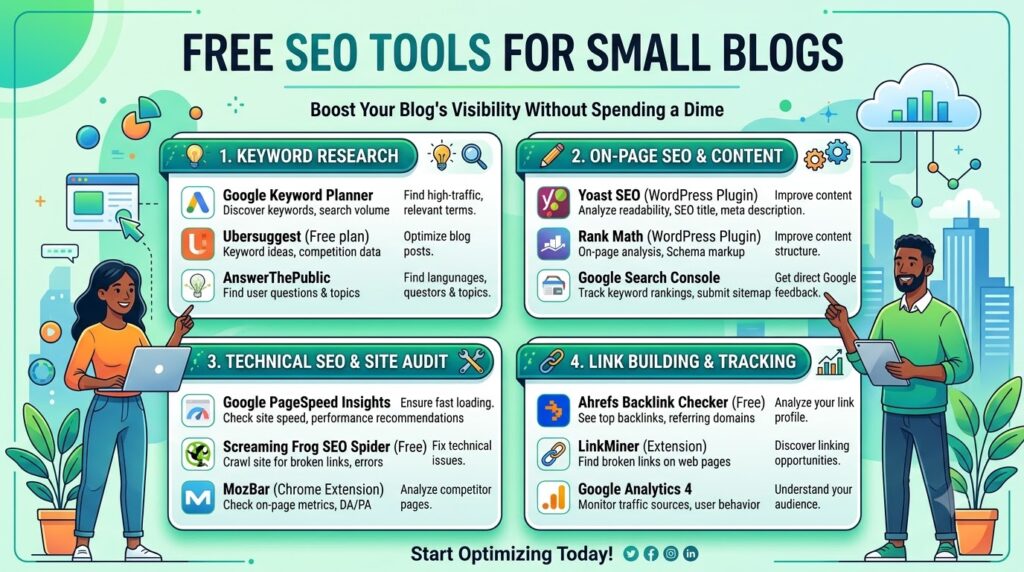
The best free SEO tools for small blogs can provide a strong foundation for keyword research, technical SEO, content optimization, search-performance monitoring and organic traffic growth without requiring a large software budget.
Start with Google Search Console because it provides valuable information about your website’s actual performance in Google Search.
Use Google Keyword Planner and Google Trends to discover and evaluate content ideas. Use Bing Webmaster Tools as an additional source of keyword and search-performance information.Use Ahrefs Free to supplement your SEO research with backlink, keyword and website-audit data.
Use Screaming Frog to identify technical and on-page problems. Use PageSpeed Insights to monitor page performance and Core Web Vitals. Use Google Analytics to understand what visitors do after reaching your website.
Use the Rich Results Test when you implement supported structured data.The most important thing is not how many SEO tools you use. It is how effectively you turn their information into improvements.
Research better topics.
Target specific search intent.
Create genuinely useful content.
Build relevant internal links.
Fix technical problems.
Monitor your search performance.
Refresh articles that already show potential.
Repeat the process consistently.
For a small blog, that approach can provide a solid SEO foundation without immediately paying for an expensive all-in-one platform.
🚀 Start Your Free SEO Strategy Today
You do not need an expensive SEO subscription to start improving your blog.
Start with the free tools in this guide, choose one relevant topic, research the search intent, publish a genuinely useful article, connect it with your existing content, and monitor the results through Google Search Console.
Explore more AI, SEO and blogging tools on Toolsvora.
What are the best free SEO tools for small blogs?
The best free SEO tools for small blogs include Google Search Console, Google Keyword Planner, Google Trends, Bing Webmaster Tools, Ahrefs Free, Screaming Frog SEO Spider and PageSpeed Insights. Together, these tools cover keyword research, search performance, technical SEO, indexing, backlinks and website performance.
Can a small blog do SEO without paying for tools?
Yes, a small blog can perform essential keyword research, technical SEO checks, content optimization, search-performance monitoring and basic backlink research using free tools. Paid platforms become more useful when a website needs larger datasets, advanced competitor analysis, automation or large-scale SEO workflows.
What is the best free SEO tool for beginners?
Google Search Console is one of the best free SEO tools for beginners because it provides direct information about how a website performs in Google Search, including clicks, impressions, search queries, CTR and average position. It also provides tools for URL inspection and indexing-related diagnostics.
What is the best free keyword research tool for a small blog?
Google Keyword Planner is a useful starting point for finding keyword ideas, while Google Trends helps bloggers understand changes in search interest. Bing Webmaster Tools and Google Search suggestions can provide additional keyword variations and question-based topics.
Can a new blog rank on Google without expensive SEO tools?
Yes, a new blog can work on SEO without expensive software, although no tool or strategy guarantees rankings. A new website should focus on relevant topics, realistic keywords, strong search-intent matching, helpful content, technical accessibility, internal linking and continuous improvement based on search-performance data.