Artificial Intelligence (AI) has changed the way businesses manage their daily operations. Instead of spending hours on repetitive tasks such as data entry, responding to emails, scheduling meetings, processing invoices, or generating reports, organizations can now automate these activities using AI-powered workflow automation. This allows employees to focus on strategic work, customer relationships, innovation, and business growth while AI handles routine processes with speed and accuracy.
Today, AI Workflow Automation Examples can be found in almost every industry, including healthcare, banking, education, retail, manufacturing, human resources, marketing, legal services, finance, software development, and customer support. Businesses use AI to automate complex workflows that previously required significant manual effort, improving productivity while reducing operational costs and human errors.

Whether you are a small business owner, freelancer, startup founder, enterprise manager, or digital transformation consultant, understanding real-world AI workflow automation examples can help you identify opportunities to improve efficiency within your own organization.
This guide explains how AI workflow automation works, where it is used, practical examples across industries, leading automation tools, benefits, challenges, and best practices for successful implementation.
What Is AI Workflow Automation?
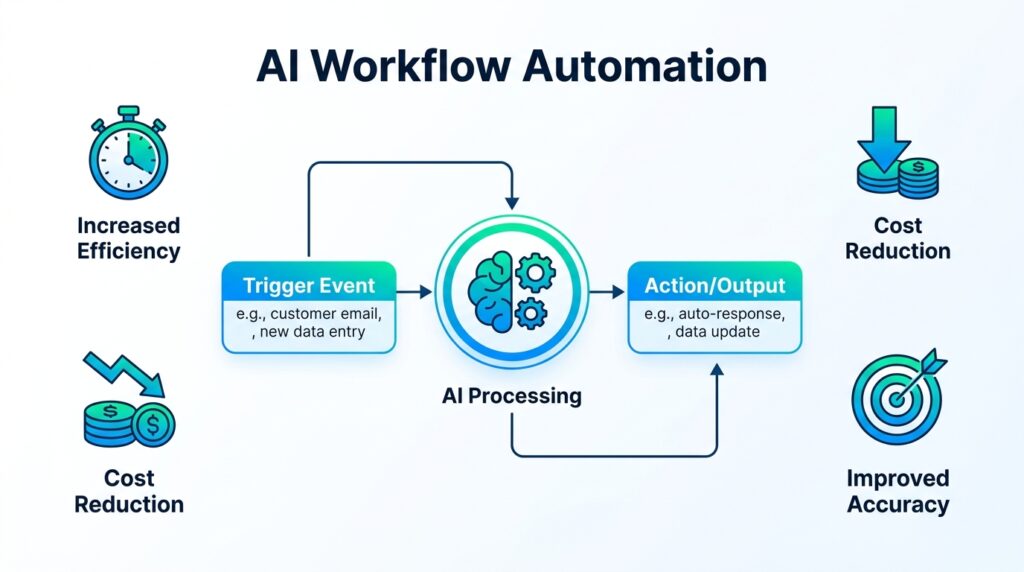
AI Workflow Automation refers to the use of artificial intelligence technologies to automate business processes from beginning to end. Unlike traditional automation that follows fixed rules, AI-powered workflows can understand language, analyze data, recognize patterns, make recommendations, classify information, and continuously improve through machine learning.
For example, when a customer submits an inquiry through a website, an AI workflow can automatically analyze the request, assign it to the appropriate department, generate an acknowledgment email, create a CRM record, schedule follow-up reminders, and notify the responsible employee without requiring manual intervention.
These intelligent workflows save time, improve accuracy, and allow businesses to operate more efficiently.
How AI Workflow Automation Works
AI workflow automation combines multiple technologies that work together to automate business processes intelligently.
A workflow usually begins with a trigger such as receiving an email, completing a form, uploading a document, or making a purchase. AI then analyzes the information using technologies such as machine learning, natural language processing (NLP), computer vision, or predictive analytics.
Based on the analysis, the workflow automatically performs actions such as updating databases, sending notifications, generating reports, creating tasks, processing payments, or escalating issues to human employees when necessary.
Because AI learns from historical data, workflows become more accurate and efficient over time.
Core Technologies Behind AI Workflow Automation
Several technologies enable intelligent workflow automation.
| Technology | Purpose |
|---|---|
| Artificial Intelligence | Intelligent decision-making |
| Machine Learning | Pattern recognition and learning |
| Natural Language Processing (NLP) | Understanding human language |
| Robotic Process Automation (RPA) | Repetitive task automation |
| Computer Vision | Image and document recognition |
| OCR (Optical Character Recognition) | Extract text from documents |
| Predictive Analytics | Forecast trends and outcomes |
| Workflow Automation | Connect business systems automatically |
Each technology contributes to automating different stages of business operations.
AI Workflow Automation Examples in Customer Support
Customer support is one of the most common areas where AI automation delivers immediate value.
A customer submits a support request through a website or mobile application. AI reads the message, determines the type of issue, checks previous interactions, assigns the request to the appropriate support team, generates an automatic acknowledgment email, and updates the customer relationship management (CRM) system.
If the inquiry is simple, an AI chatbot resolves it instantly. If it requires human assistance, the conversation is transferred to a support agent with all relevant customer information already attached.
This workflow reduces response times while improving customer satisfaction.
AI Workflow Automation Examples in Email Management
Businesses receive hundreds or even thousands of emails every day. AI automates email handling by classifying messages, detecting urgency, identifying departments, extracting important information, and suggesting responses.
For example:
- Customer email arrives.
- AI analyzes the message.
- Priority level is assigned.
- CRM is updated automatically.
- Appropriate department receives notification.
- Customer receives an instant acknowledgment.
- Follow-up reminders are scheduled.
This process minimizes manual sorting while improving communication efficiency.
AI Workflow Automation Examples in Marketing
Marketing departments use AI automation to manage campaigns across multiple channels.
A visitor downloads an eBook from a company’s website. AI immediately creates a lead profile, scores the prospect based on engagement, adds them to an email campaign, schedules personalized follow-up emails, notifies the sales team if the lead is highly qualified, and updates marketing analytics dashboards.
This entire process happens automatically without manual intervention, allowing marketing teams to nurture leads at scale.
AI Workflow Automation Examples in Sales
Sales teams use AI to automate lead management and customer follow-ups.
A potential customer submits a contact form. AI automatically:
- Creates a CRM record.
- Assigns the lead to the appropriate salesperson.
- Schedules an introductory email.
- Books a follow-up reminder.
- Predicts lead quality.
- Updates the sales dashboard.
- Monitors future customer interactions.
This workflow ensures no sales opportunity is overlooked.
AI Workflow Automation Examples in Human Resources
Recruitment involves numerous repetitive administrative activities.
An applicant uploads a resume through the company website. AI automatically extracts candidate information, evaluates skills, compares qualifications with job requirements, ranks applicants, schedules interviews, sends confirmation emails, and updates the recruitment management system.
After hiring, AI automates onboarding by assigning training modules, generating employee documents, creating IT accounts, and scheduling orientation sessions.
These workflows significantly reduce administrative effort for HR departments.
AI Workflow Automation Examples in Finance
Finance departments rely heavily on automation for accuracy and efficiency.
An employee uploads an expense receipt. AI reads the document using OCR, categorizes the expense, checks company policies, routes it for approval, updates accounting software, and schedules reimbursement automatically.
Similarly, invoice processing workflows extract supplier information, validate purchase orders, detect duplicate invoices, and initiate payment approvals without manual data entry.
AI Workflow Automation Examples in Healthcare
Healthcare providers automate many administrative processes using AI.
A patient books an appointment online. AI verifies insurance information, updates medical records, sends appointment reminders, prepares required documentation, and notifies medical staff before the visit.
After the consultation, AI generates summaries, updates patient records, creates follow-up reminders, and assists with billing.
These workflows improve operational efficiency while allowing healthcare professionals to focus more on patient care.
AI Workflow Automation Examples in Education
Educational institutions automate student services through AI.
When a student submits an admission application, AI verifies submitted documents, checks eligibility requirements, updates student databases, schedules interviews, sends email notifications, and tracks application progress.
AI also automates assignment reminders, attendance reporting, learning recommendations, and student support.
AI Workflow Automation Examples in E-commerce
Online retailers depend heavily on AI workflow automation.
A customer places an order. AI automatically:
- Confirms payment.
- Updates inventory.
- Generates invoices.
- Sends order confirmation emails.
- Creates shipping labels.
- Notifies warehouse staff.
- Updates delivery tracking.
- Requests customer reviews after delivery.
This end-to-end automation improves customer experience while reducing manual operational work.
AI Workflow Automation Examples in Legal Services
Law firms use AI workflows to manage legal documents and client communications.
When a new client submits information, AI creates digital files, schedules consultations, generates engagement documents, organizes case materials, and sends appointment confirmations.
During ongoing cases, AI tracks deadlines, summarizes legal documents, monitors compliance requirements, and organizes evidence for legal teams.
AI Workflow Automation Examples in Software Development
Software development teams automate repetitive technical workflows.
Developers commit code to a repository. AI automatically runs code quality checks, executes security scans, performs automated testing, generates documentation, deploys successful builds, and notifies team members if issues are detected.
This accelerates software delivery while improving quality.
AI Workflow Automation Examples in Manufacturing
Manufacturers automate production monitoring using AI.
Sensors continuously collect equipment data. AI analyzes performance, predicts maintenance requirements, identifies quality issues, schedules repairs, orders replacement parts, and updates production dashboards automatically.
Predictive maintenance reduces equipment downtime while improving operational efficiency.
AI Workflow Automation Examples by Industry
| Industry | Workflow Example |
|---|---|
| Customer Support | Chatbots, ticket routing |
| Sales | Lead qualification and CRM updates |
| Marketing | Email campaigns and lead nurturing |
| Human Resources | Resume screening and onboarding |
| Finance | Invoice processing and expense approvals |
| Healthcare | Appointment scheduling and patient records |
| Education | Admissions and student communication |
| Retail | Inventory and order management |
| Legal | Document review and deadline tracking |
| Manufacturing | Predictive maintenance and quality control |
These examples demonstrate the flexibility of AI automation across different business sectors.
Popular AI Workflow Automation Tools
Organizations use many AI platforms to build intelligent workflows.
| AI Platform | Primary Purpose |
|---|---|
| Zapier AI | Workflow automation |
| Make | Advanced business automation |
| Microsoft Power Automate | Enterprise workflows |
| UiPath | Robotic Process Automation |
| Automation Anywhere | Enterprise automation |
| Workato | Business integrations |
| Notion AI | Documentation workflows |
| ClickUp AI | Project automation |
| HubSpot AI | Marketing automation |
| Salesforce Einstein | CRM intelligence |
| ChatGPT | Content generation |
| Claude | Document analysis |
| Fireflies.ai | Meeting automation |
| Monday AI | Team workflows |
| Airtable AI | Business databases |
Businesses often combine multiple tools to automate complete operational processes.
Benefits of AI Workflow Automation
Implementing AI workflow automation provides numerous advantages.
- Faster business processes
- Reduced manual work
- Improved employee productivity
- Lower operational costs
- Better customer experience
- Improved accuracy
- Reduced human errors
- Faster decision-making
- Better compliance
- Improved collaboration
- Greater scalability
- More efficient resource utilization
These benefits support long-term business growth while improving organizational efficiency.
Challenges of AI Workflow Automation
Although AI workflow automation offers many advantages, organizations should also understand its limitations.
Successful implementation requires process planning, employee training, secure data management, system integration, and ongoing monitoring. Businesses should also ensure compliance with privacy regulations while maintaining human oversight for critical decisions.
AI should complement human expertise rather than replace professional judgment in situations requiring experience, ethics, or strategic decision-making.
Best Practices for Implementing AI Workflow Automation
Organizations can maximize automation success by following several best practices.
- Identify repetitive tasks first.
- Start with small automation projects.
- Select tools that integrate with existing software.
- Monitor workflow performance regularly.
- Train employees to work alongside AI.
- Protect confidential business information.
- Continuously improve workflows using performance data.
- Maintain human review for important business decisions.
Following these practices helps organizations achieve sustainable automation while minimizing implementation risks.
Future of AI Workflow Automation
AI workflow automation will continue evolving through autonomous AI agents, predictive decision-making, multimodal AI systems, voice-controlled workflows, advanced analytics, and deeper integration across enterprise applications.
Future AI platforms will automate increasingly complex business operations while allowing organizations to respond faster to changing market conditions.
Businesses that adopt AI workflow automation today will be better prepared for future digital transformation and long-term operational success.
Conclusion
Real-world AI Workflow Automation Examples demonstrate how artificial intelligence can simplify repetitive tasks, improve operational efficiency, and enhance customer experiences across nearly every industry. From customer support and sales to finance, healthcare, education, legal services, manufacturing, and software development, AI-powered workflows help organizations automate routine processes while allowing employees to focus on strategic work.
The growing adoption of Business Workflow Automation highlights the increasing importance of AI in modern organizations. By carefully selecting the right tools, implementing automation responsibly, and maintaining human oversight, businesses can improve productivity, reduce operational costs, and build more efficient, scalable, and future-ready operations.