Teaching has always involved much more than delivering lessons in a classroom. Teachers spend countless hours preparing lesson plans, creating worksheets, grading assignments, designing presentations, answering student questions, organizing learning materials, communicating with parents, and adapting content for different learning levels. In many schools and colleges, educators also manage administrative responsibilities alongside their teaching duties.
This is why free AI tools for teachers and educators are becoming increasingly valuable. Artificial intelligence can help reduce the time spent on repetitive preparation tasks while allowing teachers to focus more on student engagement, personalized instruction, and meaningful learning experiences.
AI is not meant to replace teachers. Effective teaching requires empathy, classroom management, creativity, mentorship, and human connection—qualities that AI cannot replicate. However, AI can act as a powerful teaching assistant that helps educators create resources faster, organize information more efficiently, and provide better support to students.
This guide explores the best free AI tools for teachers and educators in 2026, explains how they can be used in real classrooms, and provides practical strategies for integrating AI into lesson planning, assessment, communication, and professional productivity.
Why Teachers Should Use AI Tools
Educators often face heavy workloads, especially when teaching multiple classes or subjects.
Common Time-Consuming Tasks
- Writing lesson plans
- Creating quizzes and worksheets
- Designing presentations
- Preparing differentiated learning materials
- Grading and providing feedback
- Summarizing reading materials
- Communicating with students and parents
- Organizing classroom resources
AI tools can help automate many of these routine activities, giving teachers more time for instruction, student interaction, and professional development.
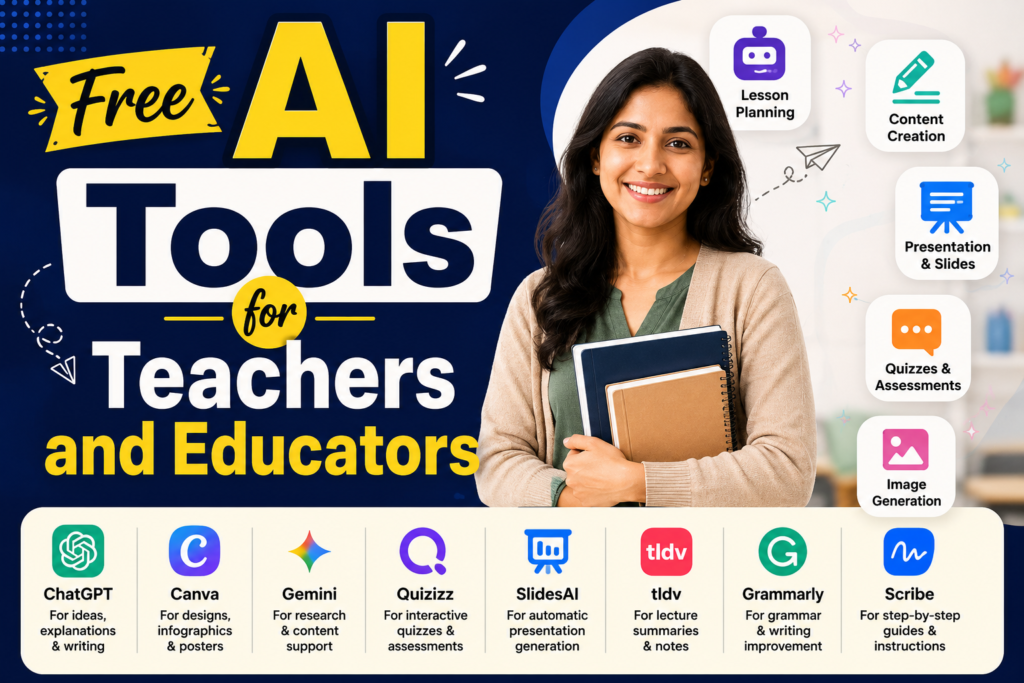
Quick Comparison of the Best Free AI Tools
| Tool | Best For | Free Plan |
|---|---|---|
| ChatGPT | Lesson planning and teaching support | Yes |
| Google Gemini | Research and educational content | Yes |
| Canva for Education | Presentations and classroom visuals | Yes |
| Quizizz | AI-assisted quizzes and assessments | Yes |
| Notion AI | Lesson organization and planning | Limited free usage |
| Grammarly | Feedback and professional writing | Yes |
| Microsoft Copilot | Office productivity for educators | Limited free access |
| Otter.ai | Lecture and meeting transcription | Limited free plan |
| Kahoot! | Interactive classroom quizzes | Yes |
| Perplexity AI | Source-based research and fact checking | Yes |
ChatGPT — Best Overall AI Assistant for Teachers
ChatGPT is one of the most versatile AI tools available for educators. It can help generate teaching materials, simplify complex concepts, and save significant preparation time.
What Teachers Can Use It For
- Lesson plan creation
- Worksheet generation
- Quiz and discussion question creation
- Explaining difficult concepts in simpler language
- Creating differentiated activities for different grade levels
- Drafting parent communication
- Generating project ideas and classroom activities
Example Prompt
“Create a 45-minute lesson plan for Grade 8 students on renewable energy, including learning objectives, classroom activities, discussion questions, and a short exit ticket.”
This can provide a structured starting point that teachers can adapt to their curriculum and classroom needs.
Best For
- School teachers
- College lecturers
- Tutors and coaching instructors
- Online educators
Google Gemini — Best for Research and Educational Content
Gemini is particularly useful for gathering and organizing educational information.
Practical Uses
- Summarizing long articles
- Creating topic outlines
- Comparing historical events or scientific theories
- Generating classroom discussion prompts
- Preparing background research for lessons
- Creating reading comprehension questions
Example Use
A teacher preparing a lesson on climate change could ask Gemini to provide:
- Key causes
- Important terminology
- Age-appropriate explanations
- Discussion questions for students
Best For
- Research-based subjects
- Social studies
- Science teachers
- Higher education instructors
Canva for Education — Best for Visual Teaching Materials
Visual learning is extremely important for student engagement. Canva’s education version offers powerful design tools for teachers.
Free Education Features
- Presentation templates
- Infographics
- Classroom posters
- Worksheets
- Flashcards
- Certificates
- Lesson visuals
- Collaborative student projects
Classroom Examples
Teachers can create:
- Vocabulary flashcards
- Science process diagrams
- History timelines
- Classroom rules posters
- Interactive digital worksheets
- Student project templates
Why It Is Valuable
Canva allows educators to create professional-looking teaching materials without graphic design experience, making lessons more engaging and visually appealing.
Quizizz — Best for AI-Assisted Assessments
Quizizz helps teachers create interactive quizzes, homework assignments, and formative assessments.
Useful Features
- AI-generated quiz questions
- Automatic grading
- Homework mode
- Student performance reports
- Gamified classroom experience
- Question banks for multiple subjects
Benefits for Teachers
Instead of manually writing dozens of questions, educators can generate a quiz based on a topic and then edit or customize the questions as needed.
Best For
- K–12 classrooms
- Competitive exam coaching
- Revision sessions
- Formative assessment
Notion AI — Best for Organizing Teaching Resources
Notion is excellent for managing large amounts of educational content.
Teachers Can Organize
- Lesson plans
- Unit plans
- Assignment schedules
- Student progress notes
- Reading resources
- Project ideas
- Meeting notes
- Professional development materials
AI Features
- Summarizing notes
- Generating task lists
- Organizing lesson outlines
- Creating planning templates
This is especially useful for teachers handling multiple subjects or multiple class sections.
Grammarly — Best for Feedback and Professional Communication
Teachers write a large amount of text every week, including feedback, emails, reports, and instructional materials.
Grammarly Helps With
- Grammar correction
- Sentence clarity
- Professional tone
- Spelling and punctuation
- Readability improvements
Useful Applications
- Student feedback comments
- Parent emails
- School reports
- Recommendation letters
- Assignment instructions
- Professional development documents
Clear communication reduces misunderstandings and improves the quality of written feedback.
Microsoft Copilot — Best for Office-Based Teaching Tasks
Educators who frequently use Word, PowerPoint, Excel, and Outlook can benefit from Microsoft Copilot’s productivity features.
Helpful Tasks
- Creating presentation drafts
- Summarizing meeting notes
- Generating tables and charts
- Organizing attendance or grade data
- Drafting professional emails
- Preparing workshop materials
Best For
- College faculty
- School administrators
- Teachers working extensively with Microsoft 365
Otter.ai — Best for Lecture and Meeting Transcription
Otter.ai can automatically convert spoken content into searchable text.
Useful for Educators
- Recording lectures
- Capturing staff meeting notes
- Transcribing online classes
- Creating accessible learning materials
- Reviewing classroom discussions
Why It Helps
Teachers can focus on teaching and interacting with students instead of trying to write detailed notes during lectures or meetings.
Kahoot! — Best for Interactive Classroom Engagement
Kahoot! remains one of the most popular tools for making classroom learning more interactive.
Features
- Live quizzes
- Polls and surveys
- Team competitions
- Homework challenges
- Student-paced learning activities
Classroom Benefits
Gamified quizzes increase participation, especially among students who may be less likely to participate in traditional question-and-answer sessions.
Perplexity AI — Best for Source-Based Research
Perplexity AI is useful when teachers need quick research with referenced sources.
Useful For
- Fact checking
- Current affairs lessons
- Research projects
- Debate preparation
- Finding multiple perspectives on a topic
This can help educators prepare more accurate and up-to-date instructional content.
Best AI Tool by Teaching Need
| Teaching Need | Recommended Tool |
| Lesson planning | ChatGPT |
| Research and content preparation | Gemini |
| Visual presentations | Canva |
| Quizzes and assessments | Quizizz |
| Resource organization | Notion AI |
| Feedback and communication | Grammarly |
| Office productivity | Microsoft Copilot |
| Lecture transcription | Otter.ai |
| Interactive classroom activities | Kahoot! |
| Source-based research | Perplexity AI |
A Complete Free AI Workflow for Teachers
Here is a practical workflow that many educators can use daily.
Step 1: Plan the Lesson
Use ChatGPT to generate learning objectives, activities, and discussion questions.
Step 2: Research Supporting Content
Use Gemini or Perplexity AI to gather accurate background information and examples.
Step 3: Create Visual Materials
Design slides, worksheets, and posters in Canva for Education.
Step 4: Prepare Assessments
Generate and customize quizzes in Quizizz or Kahoot!.
Step 5: Organize Everything
Store lesson plans, resources, and student notes in Notion.
This workflow can significantly reduce preparation time while keeping teaching materials well organized.
How AI Can Support Different Types of Educators
School Teachers
- Create age-appropriate explanations
- Generate classroom activities
- Prepare homework and revision materials
- Design visual learning aids
College Lecturers
- Organize lecture notes
- Create presentation structures
- Summarize research articles
- Prepare seminar discussion topics
Online Tutors
- Generate personalized practice questions
- Create digital worksheets
- Draft follow-up messages for students
- Prepare quick concept explanations
Special Education Teachers
AI can help create:
- Simplified instructions
- Visual supports
- Step-by-step learning materials
- Differentiated activities for varying ability levels
Responsible Use of AI in Education
AI should be used to support teaching, not replace professional judgment.
Recommended Uses
- Drafting materials
- Brainstorming ideas
- Organizing information
- Creating practice exercises
- Improving clarity of instructions
- Saving time on repetitive tasks
Important Cautions
- Always review AI-generated content for accuracy.
- Ensure materials match curriculum requirements.
- Avoid sharing sensitive student information with AI tools.
- Adapt content to the age, culture, and needs of your students.
Human review remains essential for maintaining educational quality and appropriateness.
Tips for Better AI Prompts
Instead of
“Make a worksheet on fractions.”
Use
“Create a Grade 5 worksheet on adding and subtracting fractions with 10 questions, an answer key, and one word problem involving real-life situations.”
More specific prompts produce better and more classroom-ready results.
Common Mistakes Educators Make with AI
Using AI Output Without Verification
AI can occasionally generate incorrect facts, dates, formulas, or explanations. Always verify important educational content.
Overloading Lessons With AI-Generated Activities
Quality is more important than quantity. Select the activities that best support the learning objectives.
Ignoring Student Engagement
AI can create materials, but effective teaching still requires discussion, questioning, feedback, and human interaction.
Using Too Many Tools at Once
Start with 3–4 core tools and build a consistent workflow before adding additional platforms.
A Recommended Free AI Toolkit for Most Teachers
If I had to choose only five free AI tools for a typical teacher in 2026, I would recommend:
| Tool | Why |
| ChatGPT | Best overall teaching assistant |
| Canva for Education | Best for visual classroom materials |
| Quizizz | Best for assessments and revision |
| Notion AI | Best for organization and planning |
| Grammarly | Best for feedback and professional communication |
Together, these tools cover lesson planning, visual design, assessment, organization, and communication, which are the areas where most educators spend the majority of their preparation time.
Conclusion
Free AI tools for teachers and educators can significantly reduce the time spent on repetitive preparation tasks while improving the quality, organization, and engagement of classroom materials. Tools such as ChatGPT, Google Gemini, Canva for Education, Quizizz, Notion AI, Grammarly, and Kahoot! provide practical support for lesson planning, assessment creation, presentation design, research, communication, and classroom management.
The most effective approach is not to use AI to replace teaching, but to use it as a professional teaching assistant that handles routine tasks and frees up more time for student interaction, personalized instruction, mentoring, and creative classroom activities.
For most educators, starting with ChatGPT for lesson planning, Canva for visual materials, Quizizz for assessments, and Notion for organization provides an excellent foundation for AI-assisted teaching. These tools require little technical expertise, offer useful free plans, and can immediately improve both productivity and classroom preparation.
As education continues to evolve, teachers who learn to use AI thoughtfully and responsibly will be better equipped to create engaging learning experiences, manage their workload more effectively, and focus on the human aspects of teaching that matter most for student success.